| News |
|
Creative Python Programming with Strype - out now
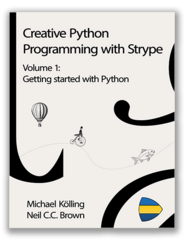
The first volume of the Strype textbook series is available now. Creative Python Programming with Strype is a series of text books, delivering a series of projects and concepts for increasing skill levels and age groups, which consists of three volumes. Volume 1: Getting started with Python is available now. It provides a thorough introduction to programming in Python with a sequence of creative and engaging examples. A free evaluation version is available on the website. |
|
Strype 2.4.1 is now available
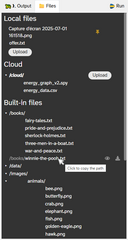
Discover new features and improvements in this latest version. Strype 2.4.1 is now availableStrype 2.4.1 is out. This release includes a new “Files” tab for better integration of files in Strype projects, performance and interaction improvements, and fixes of a number of bugs. New featuresFiles tabA new Files tab sits next to Graphics and Console in the execution area. It shows the files your programs can use:
Graphics
Book projects
Improvements
Bug fixesThe main bug fixes in this version are: better handling of the frame cursor navigation, focus restored properly after closing the colour picker or the media editor dialogs, improvements in the Graphics renderer and the Pyodide service for faster runs, The full list of changes is on the version history page. |
|
Strype v2.4.0 release
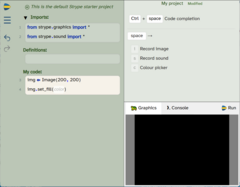
Discover new features and improvements in this latest version. Strype 2.4.0 is now availableStrype 2.4.0 is out. This release adds new editing features, improves autocompletion and cloud storage, and fixes a number of bugs. What’s new
Improvements
Bug fixes This release fixes a number of bugs, including: - spurious undo/redo actions - pasting text with an unterminated quote - examples showing as modified straight after loading - false syntax errors on semicolons - saving and loading f-strings with unbalanced braces - rotate cropping non-square images in the image editor The full list of changes is on the version history page. |
|
Frame insertion on steroids: typing frames

Strype has a new way of inserting frames: typing for frame insertion. Frame-based editing has been around for some years, and was first implemented in the Stride language, within the Greenfoot environment. Strype inherited most of the semantics of user interaction for the insertion and manipulation of frames from that system. The latest release of Strype, however, introduces a significant departure in how frames are inserted. There are now three ways to create a new frame at the location of the frame cursor: clicking with the mouse, using a shortcut key sequence, or just typing the frame keyword. The second option – which was achieved by just typing a shortcut key previously – now requires a key sequence. Where a user typed [i] for an if-statement before, they now type the sequence [space]-[i] ([TAB] will work as well as the space key). The most interesting option is the third: Users can now just start typing “if “ and the text will be recognised and automatically be converted into an if-frame. Look out for discussion of this new feature in the forum discussions. More detail will be available there. |
|
New forum software

The new Strype Teachers’ Lounge has now opened with new functionality. We have migrated the teachers’ forum to a new software platform to better support our user community. Most importantly, the forum now supports sharing of resources, which we hope will become a valuable source of material for our community members. In the resource section, you are encouraged to share any material you have, including worksheets, Strype projects, project ideas, and anything else that might be useful. You can also edit or add to resources (resources are based on a wiki model – everyone is encouraged to contribute), and you can leave comments for resources. Leaving comments provides valuable information for other users who might consider using it. There is, of course, also a discussion forum for you to leave comments and ask questions. The new forum software is written and maintained by the Strype team, and no users data is (or will be) shared with third parties. Enjoy the new forum! |
Created by

Copyright King's College London, 2026. Contact us.